Showing posts with label Update. Show all posts

Friday, 9 November 2012

Want to add subtitles to Vocaloid Videos?

Well, the first task would be to find a decent video editing software, but which one do you use?

I've been looking around lately, trying out the so called 'best' programs to use, and I have compiled a list for you guys to see which is the best to use.
After all, there is only advice on editing the videos, but we need advice on adding subtitles!

NOTE to you guys: These reviews are mainly negative - but as most programs out there are lacking!

1. Windows Movie Maker
According to just about anyone, Wndows Movie Maker is the best choice, but for Windows XP users, it is just about useless for subtitles. The only available version for XP adds text in huge letters across the video, and this is useless when deciding you want to sub an animated PV. It also does not let you edit mp4 files, so you have to convert them before you can sub them. The new version is said to be a lot better, but concidering I have XP...moving on...


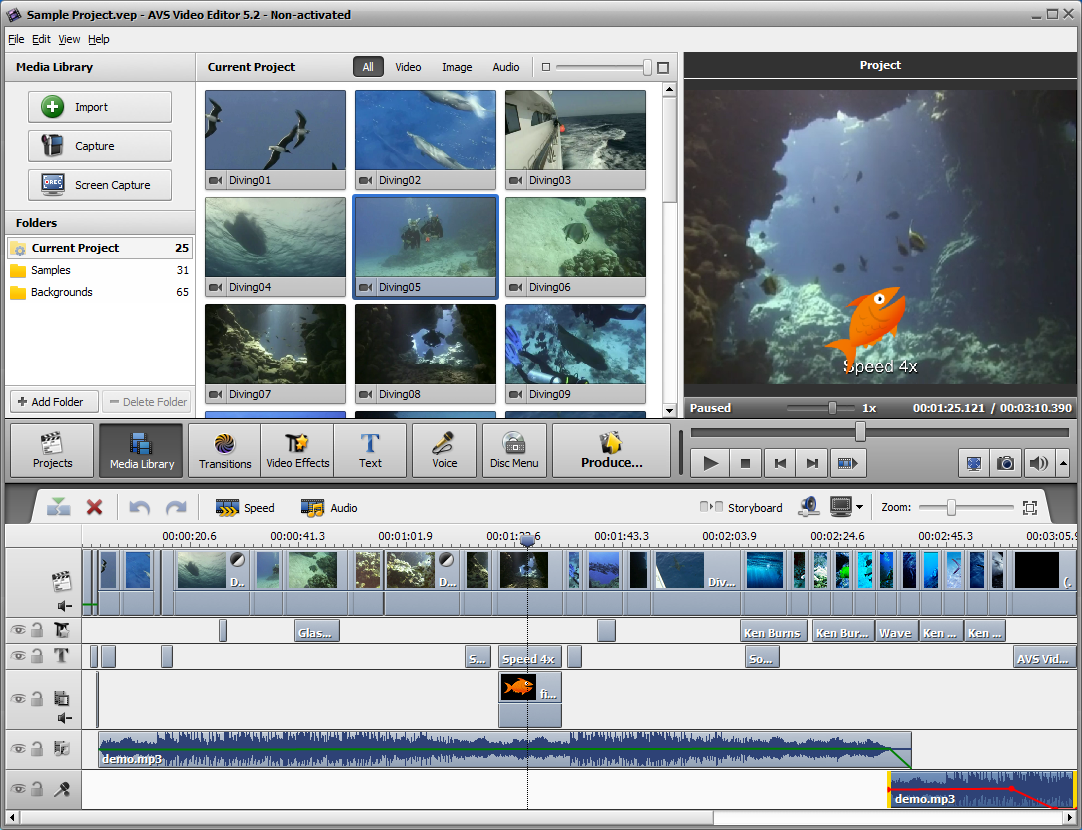
2. AVS Video Editor

This video editor is pure genius when it comes to the general program. It is easy to use, and although can tend to lag, has a huge variety in what you do with text. It would be my top pick, but it always comes down to one thing: Price. If you download the free version, it still seems miraculous in the beginning, as it still has a huge variety in features. However,  at the end of your creation, when it comes to converting the video, it places a strange red watermark in the centre of the video - unless you buy the full version. There is also lots of variety in the format you save it as, which can be a big bonus. But unless you're willing to pay for your creations, I'd give this download a miss, or all your end results will end in disaster.

3. VideoPad Video Editor

This video editor is quite good, but hard to get to grips with. People who haven't used the program before can struggle, and it is difficult and lags. The text is also force-ably placed at the bottom of the video. I'd avoid this program - unless you are REALLY struggling for software. It has a good variety of colours, however, and sizing the text isn't a problem.There is also a page on the website, also, where you can submit your ideas for the program. I myself have submitted a comment on subtitle adding. Also, there may be a time limit to how long you can keep the free version - I didn't keep it long enough to find out!

THE CONCLUSION

Don't download software for adding subtitles, unless you're  prepared to pay for full versions of things such as AVS. The free software has many limitations, but it seems that text is nearly always what they limit. I would advise you to get a crack instead of paying, but not only will this damage the company that makes the software, but it will harm you as you can spend hours looking for a version that works, which can clog up your computer and pick up viruses. One thing you could do, is use internet software, but often this can add water marks and other random things you don't necisarilly want. I will add links if I find any good ones later, but so far the results are minor.
Overall, however, AVS Video Editor was the winner for the task. It was easy to use and had lots of variety, they only real problem being the obvious price. It can lag, but that is generally down to your own computer, so when processing videos it is best to have that program running alone.


Sunday, 4 November 2012

Celebrate x

Another editors message here, telling you of the sites progress. 

Panda <3
I've edited the blogs directory a little to make it easier to navigate around. It just means there are quite long lists on the main pages...   If  I have missed off anything important, feel free to leave a comment so I can add it in - the help would be appreciated :)

Angel bunny <3
I can't make this message too long as my computer may die, and I may struggle     to post for the next few days as my parents have taken my laptop charger for travelling with me laptop (may I ask why?? I always travel with it, and now they've suddenly decided I wasn't to use it when I'm away?? WHY???)

Cutey Elephant

But it's my sweethearts birthday today, but sadly I can't see him, so I've sent him a nice long message and will try and bake him shortbread :3  Yum Yum <3

Fluffy Creature
And lastly, it seems as if I'm going to have to wait longer for this blog to be any more noticed. I have a few random flags in the flag counter, but nothing special as they all seem to be people of a language that can't read this. I need to gain more returning members, so I might have to advertise somewhere, or message people on Crunchyroll or something (not that I go on there much any more...)

Sheepy
   For people who read this, thanks very much :) please try the new directory and see if    it is better or not. If any links are broken, feel free to email me or comment.


Giraffe
       Thankies <3 x
           from your blogger <3

Thursday, 18 October 2012

Cute Widgets for My Blog!

GIF image from Cutefactor.com
Creator here, just giving my first ever editorial message.
I'll be doing these every now and then, to give updates on how the blog is doing and how updates on my posting.

I've Found the Cutest way of sprucing up the blog!

WIDGETS!

For all of you that own a blog, you'll know you can add little gadgets and widgets to help personalise your blog.
For those that don't, take a look around the blog and you'll notice things like the blog archive, and the cute cat in the bottom left corner. These are all little things called widgets.
Here is a tutorial on how to add widgets you've discovered on other sites into your blog:
Foreign Blog (But still easy to understand)

I knew about widgets before, but I've only just figured that there are a wide variety of things you can do with these little gems.

I'm officially addicted to the cute icons, and here are a few sites that successfully give you cute HTML codes for your blog:
Cuteki.com
Foreign Blog - (Still pretty easy to direct around)


For those who can't yet get the gist of widgets, here are some cute moving images you can use by adding their link as a picture:
Cutefactor.com - Bunnies and Rabbits
 Anikaos.com - Huge Lists of Images
Cherrybam.com - Pigs, Panda etc.   - On this site, remember to copy the image link, not the HTML if wanting as a picture!
Dancing Pig  - It just had to go in the  list...


GIF image from Cutefactor.com

I praise you almighty Widgets!!!